%%%%%%%%%%%%%%%%%%%%%%%%%%%%%%%%%%%%%%%%%%%%%%%%%%%%%%%%%%%%%%%%%%%%%%%%
%%
%% GasTeX : Graphs and Automata Simplified in TeX
%%%%%%%%%%%%%%%%%%%%%%%%%%%%%%%%%%%%%%%%%%%%%%%%%%%%%%%%%%%%%%%%%%%%%%%% %% %% GasTeX : Graphs and Automata Simplified in TeX

\begin{figure}[H]
  \begin{center}
    \unitlength=4pt
    \begin{picture}(15, 28)(0,-10)
      \gasset{Nw=5,Nh=5,Nmr=2.5,curvedepth=3}
      \thinlines
      \node(A0)(7.5,0){$0$}
      \node[Nmarks=i,iangle=90](A1)(0,13){$1$}
      \node[Nmarks=if,iangle=90,fangle=90](A2)(15,13){$2$}
      \drawloop[loopangle=180](A1){$a$}
      \drawloop[loopangle=0](A2){$b$}
      \drawedge(A1,A2){$a$}
      \drawedge(A2,A1){$b$}
      \drawedge(A2,A0){$a$}
      \gasset{curvedepth=-3}
      \drawedge[ELside=r](A1,A0){$b$}
      \drawloop[loopangle=270](A0){$a, b$}
    \end{picture}
  \end{center}
  \caption{La complétion de l'automate.}
\end{figure}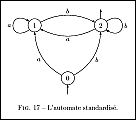
 | Code |
| binary relation | |
 | Code |
| binary tree (post order) | |
 | Code |
| undirected graph (a) | |
 | Code |
| undirected graph (b) | |
 | Code |
| undirected graph (c - linear) | |
 | Code |
| fsa (final 0 or even 1's) | |
 | Code |
| fsa (subword 00 or even 1's) | |
 | Code |
| fsa (ends in a - - , deterministic) | |
 | Code |
| cube (strings Hamilton dist 1) | |
 | Code |
| CMB Euler path | |
 | Code |
| CMB probes (A..G) and clones (1..6) | |
 | Code |
| CMB PQ trees | |
 | Code |
| Hilbert curve (tiles) |
This passage is produced by the following input:
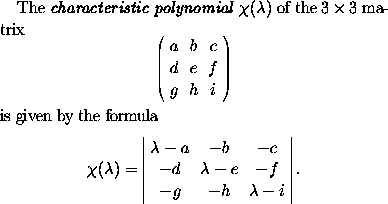
The \emph{characteristic polynomial} $\chi(\lambda)$ of the
$3 \times 3$~matrix
\[ \left( \begin{array}{ccc}
a & b & c \\
d & e & f \\
g & h & i \end{array} \right)\]
is given by the formula
\[ \chi(\lambda) = \left| \begin{array}{ccc}
\lambda - a & -b & -c \\
-d & \lambda - e & -f \\
-g & -h & \lambda - i \end{array} \right|.\]
\left and \right to produce the large delimiters around the arrays. As we have already seen, if we usethen the size of the parentheses is chosen to match the subformula that they enclose. Next note the use of the alignment tab character\left)...\right)
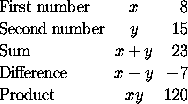
& to separate the entries of the matrix and the use of \\ to separate the rows of the matrix, exactly as in the construction of multiline formulae described above. We begin the array with \begin{array} and end it with \end{array}. The only thing left to explain, therefore, is the mysterious {ccc} which occurs immediately after \begin{array}. Now each of the c's in {ccc} represents a column of the matrix and indicates that the entries of the column should be centred. If the c were replaced by l then the corresponding column would be typeset with all the entries left-justified, and r would produce a column with all entries right-justified. Thus\[ \begin{array}{lcr}
\mbox{First number} & x & 8 \\
\mbox{Second number} & y & 15 \\
\mbox{Sum} & x + y & 23 \\
\mbox{Difference} & x - y & -7 \\
\mbox{Product} & xy & 120 \end{array}\]
Note that both columns of this array are set flush left. Thus we use
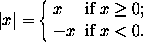
{ll} immediately after \begin{array}. The large brace is produced using\left\{. However this requires a corresponding \right delimiter to match it. We therefore use the \emph{null delimiter} \right. discussed earlier. This delimiter is invisible. We can therefore obtain the above formula by typing\[ |x| = \left\{ \begin{array}{ll}
x & \mbox{if $x \geq 0$};\\
-x & \mbox{if $x < 0$}.\end{array} \right. \]
\begin{enumerate}

\item ...

\end{enumerate}
\usepackage{enumerate}

...

\begin{enumerate}[I]%for capital roman numbers.

\item

\end{enumerate}
\begin{enumerate}[(a)]%for small alpha-characters within brackets.
\item
\end{enumerate}\begin{itemize}
\item ...
\end{itemize}\renewcommand{\labelitemi}{$\bullet$}
\renewcommand{\labelitemii}{$\cdot$}
\renewcommand{\labelitemiii}{$\diamond$}
\renewcommand{\labelitemiv}{$\ast$}$\bullet$ ( ),
$\cdot$ ( ),
$\diamond$ ( ),
$-$ ( ),
$\ast$ ( ) and
$\circ$ ( ).
\begin{description}

\item[] ...

\end{description}\begin{description}
\item[Biology] Study of life.
\item[Physics] Science of matter and its motion.
\item[Psychology] Scientific study of mental processes and behaviour.
\end{description}
\begin{itemize}\itemsep2pt

\item

\end{itemize}
> i run latex on the file.. it runs file; then i run makeindex on the
> file, it runs fine.  then i run latex on the file again, and it
> starts complaining.

makeidx.sty uses \write, (not \immediate\write) for index entries
which means that the output to the index file is delayed until the
whole page is output.  You thus have to do two things.

  . Move \printindex into a CJK environment

  . Insert \newpage after \printindex.

Below is my (slightly changed) version which works just fine.


    Werner


======================================================================


\documentclass[12pt]{article}

\usepackage{CJKutf8}
\usepackage{pinyin}
\usepackage[vietnam]{babel}
\usepackage{makeidx}


\makeindex


\begin{document}

\begin{CJK}{UTF8}{bsmi}

我是美國人\index{美國 mỹ quốc}

我不會說中文\index{cannot speak}

\printindex
\newpage

\end{CJK}

\end{document}

%%% Local Variables:
%%% coding: utf-8
%%% mode: latex
%%% TeX-master: t
%%% End: